How to hide blogger navbar.
As you noticed blogger's default templates have navbar on
the top just below the browser. If you not like this, here
is the trick how to hide this.

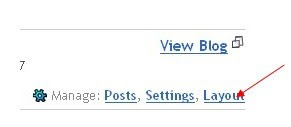
1. Sign in to your blogger account. Click on the layuot button on
the top.
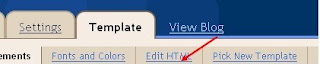
 2. Now click on the Edit HTML as shown in the picture below.
Here your blog html editor will be opened where you have
to put code to hide navbar.
As you noticed blogger's default templates have navbar on
the top just below the browser. If you not like this, here
is the trick how to hide this.

1. Sign in to your blogger account. Click on the layuot button on
the top.
 2. Now click on the Edit HTML as shown in the picture below.
Here your blog html editor will be opened where you have
to put code to hide navbar.

